Businesses lose $12.9 million annually due to poor data quality. Yet, fewer than half of brands effectively execute cross-channel campaigns. Why? Disconnected systems and inconsistent data.
Cross-channel data integration solves this by unifying customer data from multiple platforms - email, SMS, CRM, social media, and more - into one system. Agencies and businesses gain a complete view of customer behavior, enabling better segmentation, accurate attribution, and consistent messaging.
Key takeaways:
- Catalog all data sources and assign ownership to streamline integration.
- Standardize formats (e.g., dates, currency) to avoid costly errors.
- Use automated tools for syncing data and reducing manual work.
- Build unified customer profiles for targeted campaigns.
- Scale operations with white-label platforms for recurring revenue.
Example ROI: Agencies reselling white-label integration tools can charge 2–4× markup, turning $149/month into $400–600/month per client.
Next steps: Start by auditing your data sources, then move toward centralized integration tools to simplify processes and increase profitability.
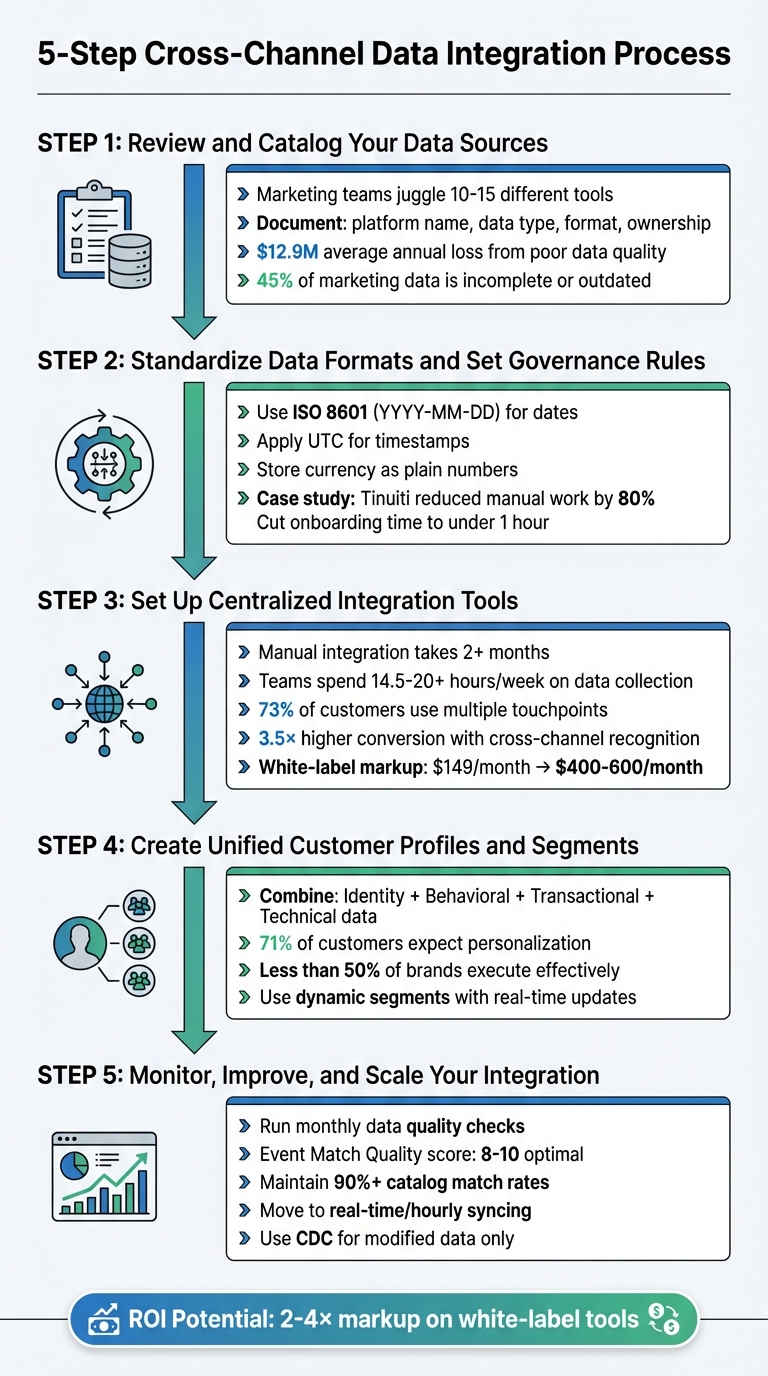
5-Step Cross-Channel Data Integration Process for Agencies
Cross-platform measurement and attribution
sbb-itb-537ed4c
Step 1: Review and Catalog Your Data Sources
Before diving into integration, take a step back and catalog all your data sources. Marketing teams often juggle information from 10–15 different tools, which makes it easy to miss something important. Start by creating a detailed inventory of every platform and system that interacts with customer data. This includes everything from your CRM and email marketing tools to social media dashboards, ad networks, analytics platforms, e-commerce systems, and even offline data like partner contributions or in-store purchases. This inventory will serve as the foundation for standardizing formats and automating integrations later on.
List All Data Sources
For each system, document key details: platform name, the type of data it handles, the data format (e.g., JSON, CSV, SQL), and who is responsible for it. For instance, Salesforce might be your go-to for customer profiles, while Google Ads tracks paid media performance. Assigning ownership - whether to Marketing, Sales, or IT - not only prevents confusion but also makes troubleshooting and updating integration rules much easier.
Check Data Quality and Completeness
Inaccurate or incomplete data can be a costly problem. On average, organizations lose $12.9 million annually due to poor data quality. In fact, CMOs estimate nearly 45% of the data their teams rely on is incomplete, outdated, or just plain wrong. To avoid these pitfalls, evaluate your data sources against six key criteria:
- Accuracy: Does the data reflect reality?
- Completeness: Are all necessary fields filled out?
- Consistency: Are formats standardized across systems?
- Uniqueness: Are there duplicate entries?
- Timeliness: Is the data up to date?
- Validity: Does it comply with rules or expected formats?
Look for null values in critical fields, verify numbers fall within expected ranges (e.g., no negative prices), and cross-check business totals like revenue against trusted records from your finance team. As Diana Gonzalez, Director of Revenue Operations at Riverside.fm, emphasizes:
If you don't do it really, really thoroughly from the beginning, you do have to spend a lot more time fixing things down the line.
Document Data Flow Between Channels
Understanding how data moves through your systems is just as important as cataloging the sources themselves. Map out these flows to pinpoint bottlenecks and identify a single source of truth for overlapping data. A visual map can help you see where delays occur or where conflicting information might arise - like when your email platform and CRM track customer statuses differently. Decide which system will act as the definitive source.
This mapping process also helps with regulatory compliance, such as GDPR or CCPA. Properly documenting consent fields and personal data ensures you're compliant across all platforms. Start with a small test case - map two sources and two entities, like customers and orders - to prove the value of this approach before scaling it across your entire tech stack.
Step 2: Standardize Data Formats and Set Governance Rules
After cataloging your data sources, the next priority is ensuring consistency in data formats. Imagine one system storing dates as MM/DD/YYYY while another uses DD/MM/YYYY - this mismatch can lead to reporting errors that undermine your agency's credibility. In fact, poor data quality costs organizations an average of $13 million annually, with some losing up to 6% of their annual revenue due to these inconsistencies and governance gaps. Standardizing data formats early on is critical for smooth integration down the line.
Create Standard Formats and Metrics
Start by developing a centralized data dictionary that defines mandatory fields, formats, and naming conventions. For example:
- Use ISO 8601 (YYYY-MM-DD) as the standard for dates.
- Apply UTC (Coordinated Universal Time) for all timestamps to avoid synchronization issues across time zones.
- Store currency fields as plain numbers (e.g., 12000) to ensure calculations remain accurate.
A real-world example of this approach comes from marketing agency Tinuiti. They faced the challenge of managing millions of data points across over 100 marketing channels. By implementing automated schema mapping in 2025, Tinuiti reduced manual pipeline maintenance by 80% and cut the onboarding time for new data sources to under an hour. The secret? They created reusable transformation libraries that automatically standardized data from multiple sources into a single format. These efforts laid the groundwork for seamless data integration in subsequent steps.
Establish Data Governance Policies
Standardization isn't enough without strong governance. Clear access rules, quality controls, and compliance with privacy regulations like GDPR and CCPA are essential to avoid compliance risks and hefty fines. As Burkhard Berger, Founder of Novum, aptly explains:
"If marketing data doesn't have rules, it makes its own. Leads end up in the wrong lists. Campaigns chase ghosts. Reports turn into finger-pointing sessions."
To establish effective governance:
- Assign data owners for each category (e.g., Marketing Ops for CRM data, Paid Media for campaign data). These owners should define quality standards, manage permissions, and resolve discrepancies when teams interpret metrics differently.
- Use automated validation tools to enforce schema rules and catch errors at the point of entry.
- Schedule a quick 15-minute monthly data health check to review missing fields, duplicates, and tracking consistency.
Step 3: Set Up Centralized Integration Tools
After standardizing your data formats and establishing governance rules, the next step is choosing the right platform to unify all your data. Here, agencies often face a key decision: should they build custom integrations in-house or opt for a centralized solution that simplifies the process? Building a single manual integration can take over two months, while marketing teams spend an average of 14.5 to 20+ hours per week just managing and collecting customer data. For agencies juggling multiple client accounts, cutting down on manual data handling can save countless hours.
Select an Integration Platform
The integration platform you choose plays a pivotal role in how effectively you can consolidate data from tools like CRMs, email platforms, advertising systems, and eCommerce software. Look for platforms with extensive APIs, pre-built integrations, and strong security measures. Compliance with regulations like GDPR and CCPA is non-negotiable when dealing with client data across different regions.
Another critical feature to consider is identity resolution - the ability to link fragmented customer identities across devices and channels. Why does this matter? Because 73% of customers engage with multiple touchpoints before making a purchase, and they are 3.5× more likely to convert when they feel recognized across channels.
Configure Automated Data Syncing
Manual data entry isn’t just time-consuming - it’s prone to errors. Automating your data syncing ensures your information stays up-to-date across all channels without constant human oversight. Decide on the best sync frequency for your needs: real-time syncing is ideal for immediate actions like triggering emails based on user behavior, while batch processing works well for tasks like historical analysis or monthly reporting.
When setting up your syncing process, you’ll need to choose between ETL (Extract, Transform, Load) for pre-cleaned data or ELT (Extract, Load, Transform) for faster, high-volume data loads. Either way, incorporating Change Data Capture (CDC) techniques allows you to automatically track and replicate changes from your source databases.
It’s also essential to process only data with proper user consent, a practice known as consent orchestration. Assign a data leader to oversee the tracking plan, conduct regular audits, and eliminate redundancies or inaccuracies before they impact your reporting.
Once automated syncing is in place, scaling your operations with a branded integration platform becomes the logical next step.
Scale Operations with White-Label Technology
With efficient data syncing as your foundation, white-label platforms provide a powerful way to scale operations and elevate client offerings. These platforms transform data integration from a cost-heavy task into a revenue-generating service. Instead of building separate integrations for each client’s eCommerce platform - a process that can take months - a unified API can handle products, orders, and taxes across 40+ marketplaces in under a month.
For agencies and consultants, platforms like White Label AI Solutions deliver enterprise-grade integration tools that you can rebrand as your own. This allows you to maintain your branding while offering sophisticated analytics and integration dashboards. White-label platforms also let you scale without adding staff, as they automate much of the heavy lifting. Agencies typically mark up these platforms by 2–4×, turning a $149/month cost into $400–600/month in client billing.
By adopting white-label technology, you can grow your client base without a proportional increase in workload. Automated pipelines consolidate metrics from over 500 sources, freeing your team to focus on strategy rather than manual data tasks. Additionally, this approach prepares your operations for the future, enabling you to adapt to evolving client needs without starting from scratch.
Ready to take the leap? Thousands of agencies, consultants, and solution providers have already transformed their businesses with white-label technology. Start offering enterprise-grade solutions under your brand today - no engineering required. You’ll enjoy faster launches, higher margins, and a scalable service line that keeps your brand front and center while trusted platforms handle the technical details. Learn more at White Label AI Solutions
Step 4: Create Unified Customer Profiles and Segments
Now that your centralized integration tools are in place, it’s time to build unified customer profiles from all touchpoints. This step allows you to turn raw data into actionable insights, paving the way for more personalized and effective marketing strategies. With a unified view of your customers, you can create precise segments that drive targeted campaigns.
Build Comprehensive Customer Profiles
Using the standardized data and centralized tools developed earlier, you can create detailed customer profiles that combine multiple data types:
- Identity data: Names, email addresses, phone numbers, and social media handles.
- Behavioral data: Website interactions, email engagement, and browsing history.
- Transactional data: Purchase records, order values, and cart abandonment details.
- Technical signals: IP addresses (for location), User Agent data (for device preferences), and UTM parameters (for campaign tracking).
To ensure accuracy, link anonymous sessions to known profiles using a unique identifier (e.g., userId), enabling seamless integration across channels. Before merging, normalize all data formats - use consistent date formats and establish clear conventions for fields like names to minimize errors. For critical events like checkout, shift to server-side tracking to avoid data loss caused by ad blockers.
It’s worth noting that 71% of customers expect personalized interactions, yet fewer than half of direct-to-consumer brands can effectively execute segmentation and cross-channel campaigns due to poor data quality. This highlights the importance of clean, consistent data when building customer profiles.
Define Targeted Customer Segments
Once you’ve built complete profiles, the next step is to group customers into meaningful segments. Use insights like purchase frequency, lifecycle stage, channel preferences, and transactional value to define these groups. Consistent use of UTM parameters simplifies attribution and helps avoid over-messaging across campaigns.
To further refine your approach, set up flow filters in your automation tools. For example, if a customer clicks an SMS link for an abandoned cart, automatically skip sending the email version of that campaign. As Jonathan Guez, CTO at Sunrise Brands, explains:
if you're going to be sending emails and SMS, they have to know what each other are doing.
Ensure your segments update dynamically based on real-time behavior instead of remaining static. Encourage cross-device logins to connect anonymous and known activities, giving you a more complete picture of customer behavior. With these dynamic segments, you can run tailored cross-channel campaigns that fully leverage your integrated data.
Step 5: Monitor, Improve, and Scale Your Integration
Activating unified customer profiles is a major milestone - but it’s not the finish line. To keep your data accurate and your campaigns effective, you'll need ongoing monitoring and strategic adjustments. As your agency grows, your systems must handle increasing data demands without sacrificing performance.
Run Regular Data Quality Checks
Monthly data quality checks are essential to catch errors and discrepancies early. Neal Fogarty, Senior Account Executive at Adverity, highlights this:
Regular spot-checks are your most potent defense against data quality issues, so auditing, validating, and reconciling your data will keep errors in check and maintain your data quality in the long run.
Automate validation rules to detect missing values, formatting issues, and duplicate entries. Watch for unusual trends, such as sudden dips in daily row counts or unexpected spikes in null values, so you can address potential problems quickly. Test critical fields regularly - ensure IDs are unique, revenue values are non-negative, and analytics settings like "Visitor Engagement" periods are optimized for clean attribution (e.g., set to 1 day).
Refine Strategies Based on Performance
Once your data quality processes are solid, focus on improving campaign performance. Use cross-channel reports to fine-tune conversion attribution and customer engagement strategies. Flexible, algorithm-driven attribution models can help you adapt to changing conditions. To improve Event Match Quality (EMQ), prioritize high-value parameters like email addresses, phone numbers, and external IDs - scores between 8 and 10 signal strong user identification. Maintain catalog match rates above 90% to keep ads relevant.
Move from nightly batch processing to real-time or hourly syncing. This ensures your audiences and optimization algorithms respond to current market trends without delay. As Fogarty stresses:
Data should be as fresh as possible so that your marketing teams can make decisions on what happened today rather than what occurred last week.
Additionally, adjust deduplication windows - up to 48 hours for web data and 7 days for offline data - to avoid double-counting across multiple sources. These refinements will prepare your system to handle the demands of growing data volumes effectively.
Prepare for Growth
As your agency scales, your integration platform must grow with it. Strengthen your infrastructure by adopting advanced processing tools. For example, distributed frameworks like Apache Spark can split tasks across multiple nodes, ensuring seamless performance as data volumes rise. Implement Change Data Capture (CDC) to sync only modified data in real time, saving resources and increasing efficiency. Use columnar storage formats like Apache Parquet to speed up queries by pulling only the columns you need.
Looking to expand your offerings? White-label technology can help you launch enterprise-grade solutions under your brand without complex engineering. This approach accelerates your time to market, boosts profit margins, and creates a scalable service line that keeps your brand at the forefront. Visit InnovaAI.io to learn more.
To ensure resilience, use circuit breakers to pause calls to unresponsive APIs and Dead-Letter Queues (DLQs) to isolate failed records. Track key performance indicators like data latency and job completion times, and set up alerts for any performance drops. As DocsBot AI explains:
True scalability isn't just about handling more data; it's about maintaining performance and cost-efficiency as you grow, ensuring your infrastructure supports rather than limits business ambition.
FAQs
What are the best practices for maintaining data quality across multiple marketing channels?
To keep your marketing data accurate and reliable, start by developing a unified data structure paired with a consistent tagging strategy. This means standardizing the data fields you collect across all touchpoints - whether it’s social media, email campaigns, video content, or your CRM. Consistency is key to ensuring your data remains both accurate and actionable.
Adopt a single tagging framework across all platforms, and make sure you’re capturing and respecting user consent at every step. Leveraging automated tools can help you monitor data quality, quickly catch errors, and validate information in real time. Centralizing your data in a warehouse or lake allows you to align information from different sources more effectively. Don’t forget to document the origins of your data clearly - this will make it easier to manage and reference later.
It’s also critical to stay aligned with privacy regulations like GDPR and CCPA. Regularly review your consent logs and adjust your practices to stay compliant. Taking these steps ensures your data remains trustworthy and sets the foundation for better marketing performance.
What are the advantages of using white-label platforms for cross-channel data integration?
Using white-label platforms for cross-channel data integration can significantly enhance your agency’s service offerings while maintaining your brand identity. These platforms let you deliver top-tier solutions under your own branding, combining reliability with a seamless client experience.
Here’s why they’re a game-changer:
- Quick deployment: Pre-built and ready to go, these platforms enable rapid integration of data across multiple channels - no need for lengthy engineering processes.
- Cost savings: Skip the expense of custom development while still delivering high-value, professional-grade services.
- Growth-ready: Built to handle increasing data demands, these platforms ensure your agency can scale its services effortlessly as your client base grows.
By adopting white-label solutions, you can dedicate your energy to strengthening client relationships and achieving measurable outcomes, while the technology works behind the scenes to simplify the process.
How do automated data syncing and identity resolution improve cross-channel marketing campaigns?
Automated data syncing brings all customer interactions - like email opens, purchases, social media activity, and in-store visits - into one centralized system. By doing so, it wipes out delays and errors from disconnected data sources, paving the way for real-time, context-aware messaging and precise performance tracking across multiple channels.
Identity resolution takes this a step further by merging these data streams into a single, unified customer profile. It works by matching key identifiers - such as email addresses, device IDs, and loyalty numbers - to create a complete picture of each customer. This unified view empowers marketers to segment audiences more effectively, run tailored campaigns, and confidently track which channels deliver results, enabling smarter budget allocation.
By combining these tools, agencies can turn fragmented data into an actionable system. The result? Consistent, personalized experiences across every channel, improved engagement, accurate ROI measurement, and less manual work - all while reducing the risk of data inconsistencies.